What Is MCP? Model Context Protocol Explained Simply
Ask what is MCP and you will get a wall of jargon about protocols, servers, and JSON-RPC before anyone tells you the one thing that matters. So here it is first: MCP, the Model Context Protocol, is a standard way to plug any tool into any AI. Anthropic released it as an open standard in November 2024, and within a year OpenAI, Google, Microsoft, and IBM had all signed on. That kind of agreement between rivals almost never happens, which is the first clue that MCP solves a real problem.
The best analogy, and the one Anthropic itself used, is a USB-C port for AI. Before USB-C, every device had its own cable. Now one plug works across your laptop, phone, and headphones. MCP does the same job for artificial intelligence: one standard connection so a model can reach your files, your database, your CRM, or your chat app without a bespoke integration for each. I have wired AI systems to external tools the hard way, and the difference MCP makes is the difference between soldering your own cable every time and reaching for one that already fits.
In this guide I will define MCP in plain English, walk through the USB-C analogy, explain the mess it was built to clean up, break down how it works with a simple example, compare it to a traditional API in a table, and give you an honest answer to the question most beginners are quietly asking: do you actually need to learn this, or is knowing what it is enough?
What Is MCP, in Plain English
MCP is an open standard that lets AI applications connect to outside data and tools through one shared interface. That is the whole idea. Everything technical about it exists to serve that one goal.
Break the name apart and it explains itself. Model refers to the AI model, the large language model doing the thinking, like Claude or GPT. If you are fuzzy on what that even is, my explainer on the large language model covers the engine underneath. Context refers to the information the model needs to be useful: your documents, your live data, the actions it can take. Protocol is just an agreed set of rules for how two systems talk. Put together, Model Context Protocol means a rulebook for feeding an AI model the outside context it needs to do real work.
Here is why that matters. On its own, a language model is a brilliant brain in a sealed jar. It can reason, write, and summarize, but it knows nothing about your world. It cannot see today's sales numbers, read the file on your desktop, or check a customer's order status. All of that lives outside the model. MCP is the standard doorway through which that outside information walks in, and through which the model can reach back out to take action.
The word open is doing quiet but heavy lifting. Anthropic did not build MCP as a private feature locked to its own products. It published the specification so anyone, including direct competitors, could implement it. That is why the standard spread so fast. A protocol only becomes useful when many parties agree to speak it, the same way a language is only useful when other people understand it. An open standard invites exactly that agreement.
One line to hold onto: MCP is the standard doorway between an AI model and the messy, useful, real-world data and tools that live outside it.
The USB-C for AI Analogy
The cleanest way to understand MCP is the analogy Anthropic reached for on day one: MCP is a USB-C port for AI applications. Sit with that image, because it carries almost the entire concept.
Remember the world before USB-C. Your phone had one charger, your camera had another, your laptop a third, and every accessory shipped with its own incompatible cable. Connecting anything to anything meant hunting for the right adapter. USB-C ended that. One shape, one standard, and suddenly a single cable charges your laptop, drives a monitor, and moves files off a camera. The port did not make the devices smarter. It made them reachable.
AI was stuck in the pre-USB-C era until recently. Every time a developer wanted to connect an AI model to a tool, whether that was Google Drive, a Postgres database, or Slack, they built a one-off connector by hand. Connect the model to a second tool and you wrote a second custom connector. There was no shared shape, so nothing was reusable. MCP is the USB-C moment for that problem. A tool that speaks MCP can be reached by any AI app that speaks MCP, with no custom wiring in between.
I lean on this analogy constantly when I explain MCP to non-engineers, because it survives being pushed on. The USB-C port itself is dumb. It holds no data and makes no decisions. It is purely a standard agreement about how things connect. MCP is the same: it is not an AI, not a model, not a product. It is an agreement about the shape of the connection. Once you see that MCP is a plug and not a brain, most of the confusion around it dissolves.
There is a second layer to the analogy worth naming. USB-C works in both directions. The same port that pulls a photo off your camera also pushes power into it. MCP is bidirectional in the same spirit. An AI can read context in through an MCP connection, and it can also send actions out through it, telling a tool to create a record or send a message. The doorway swings both ways.
The quotable version: USB-C made every device reachable with one plug, and MCP makes every tool reachable to AI with one standard.
Why MCP Exists: The Integration Mess Before It
MCP exists to solve what engineers call the M times N problem, and once you see it, you cannot unsee it. The mess it replaced was not a small inconvenience. It was a genuine drag on the whole field.
Picture the situation before MCP. Say there are M different AI applications and N different tools or data sources you might want them to use. To connect everything to everything, you had to build M times N separate integrations, a custom bridge for every single pairing. Ten AI apps and ten tools meant a hundred bespoke connectors. Each one had to be written, tested, and maintained on its own. Add one new tool and you had to build a fresh connector for every AI app that wanted it. The cost did not add up. It multiplied.
Every one of those connectors was also fragile in its own private way. One used a tool's REST endpoints, another its SDK, a third some undocumented internal call. When a tool changed its interface, the connectors that depended on it broke, and someone had to go fix each one by hand. Teams were spending real engineering time not on building anything new, but on maintaining plumbing that already existed. I have watched that tax quietly eat entire sprints, and the maddening part is that none of that work made the product any smarter.
MCP collapses M times N into M plus N. Instead of a custom bridge for every pairing, each AI app implements MCP once, and each tool exposes an MCP server once. Now any MCP-speaking app can reach any MCP-speaking tool, no bespoke connector required. Ten apps and ten tools drop from a hundred integrations to twenty implementations. Add a new tool and you build one MCP server for it, and every MCP client can use it immediately. The math goes from multiplication to addition, which is the entire economic case for the standard in a single sentence.
This is also why MCP arrived exactly when it did. As AI shifted from answering questions to taking actions, the number of tools models needed to touch exploded. The old approach of hand-building connectors could not keep pace with agents that might call dozens of tools in a single task. If you are curious how those action-taking systems work, my guide to agentic AI covers why they are so hungry for tool access. MCP showed up as the plumbing that hunger required.
The line I would underline: MCP turned an integration problem that multiplied into one that merely adds, and that single change is why an industry of rivals adopted it.
How MCP Works: Host, Client, and Server
MCP works through a client-server architecture with three roles: a host, a client, and a server. Learn those three words and you understand the mechanics of the whole protocol.
The host is the AI application you actually use, the thing with the model inside it. Claude Desktop is a host. An AI coding tool like Cursor is a host. Any app where an AI model lives and does work plays the host role. The host is where the request originates and where the answer lands in front of you.
The client is a small connector that lives inside the host. Its only job is to maintain a dedicated one-to-one connection to a single server. Think of the client as the specific plug on the end of a cable, matched to one socket. If a host needs to reach three different tools, it spins up three clients, one per connection. You rarely think about the client directly, because it is the internal piece that the host manages for you.
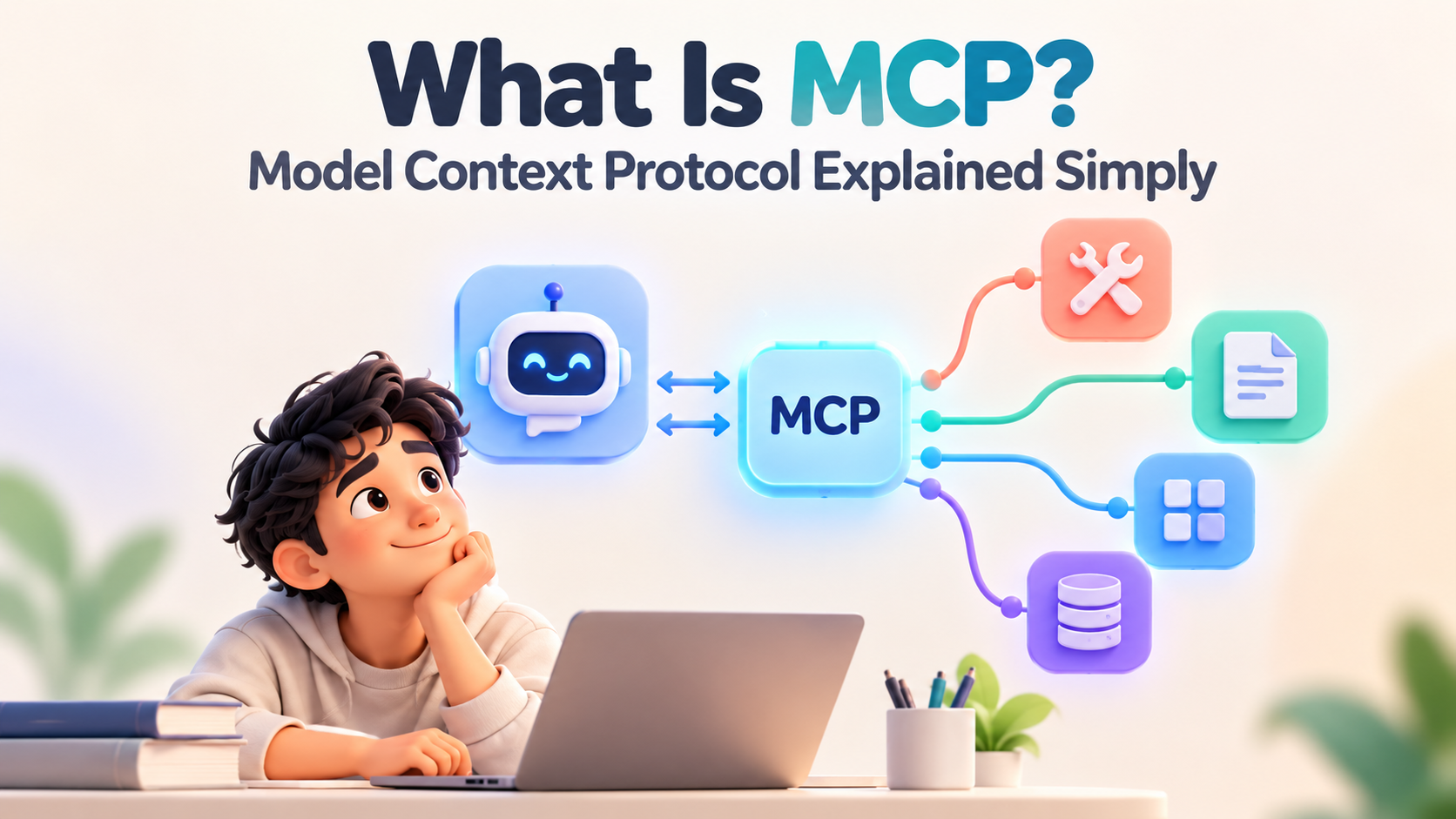
The server is where the useful stuff lives. An MCP server is a lightweight program that exposes one tool or data source in the standard MCP shape. There is a server for the filesystem, a server for a Postgres database, a server for Slack, a server for GitHub. Each server advertises what it can do, its available tools, the data it can read, the actions it can perform, and then waits for requests. The server is the socket on the wall that any matching plug can use.
Here is a simple example that ties the three together. Imagine you ask Claude, "Show me all pending orders from this week." Claude is the host. Inside it, a client is already connected to an MCP server that sits in front of your orders database. The host sends the request through the client to that server. The server runs the actual query against the database, pulls the pending orders, and hands the results back through the same connection. Claude reads those rows and writes you a clean summary. The model never touched the database directly. It spoke MCP to a server that did.
Notice how cleanly that separates concerns. The AI is responsible for understanding your request and shaping the answer. The MCP server is responsible for safely reaching the data and knowing how to query it. Neither has to know the other's internals. The host does not need to learn your database's query language, and the database server does not need to understand English. MCP is the neutral contract in the middle that lets each side do only its own job. That separation is not a detail. It is the reason the whole thing scales.
The takeaway sentence: a host holds the AI, a client makes the connection, and a server exposes the tool, and MCP is the shared language all three speak.
MCP vs API: What Actually Changes
The question I hear most from developers is simple: how is MCP different from an API? Fair question, because they overlap. The honest answer is that MCP does not replace APIs, it standardizes how AI talks to them.
A traditional API, an application programming interface, is a custom set of rules one specific service publishes so other software can talk to it. Stripe has its API, Salesforce has its API, and each is different in its endpoints, its authentication, and its data shapes. To connect an AI to Salesforce through its raw API, a developer reads Salesforce's documentation, writes code specific to Salesforce, and handles its quirks. Connect to a second service and you start over with that service's own API. APIs are powerful, but each one is its own little world with its own rules.
MCP sits one layer above that. It is a single standard for how an AI describes what it wants and how a tool describes what it offers. Under the hood an MCP server often still calls a normal API, but the AI never sees those raw differences. It speaks one consistent MCP language, and the server translates. The gain is not raw capability, since APIs could always do the work. The gain is that the AI stops needing custom code for each service and starts using one uniform interface for all of them.
Here is the comparison laid out directly.
| Dimension | Traditional API | MCP (Model Context Protocol) |
|---|---|---|
| What it is | A custom interface published by one specific service | One open standard many services agree to speak |
| Built for | Software talking to that one service | AI models talking to many tools uniformly |
| Integration effort | Custom code written per service | Implement MCP once, reach every MCP tool |
| Who defines the rules | Each service, differently | A shared, public specification |
| Tool discovery | Read each service's own documentation | Servers advertise their tools in a standard way |
| Scaling pattern | M times N custom connectors | M plus N standard implementations |
| Relationship | The underlying capability | A standard layer that often wraps an API |
The mental model that helps most: an API is a specific language each service speaks, and MCP is a universal translator the AI carries so it does not have to learn every language itself. The service can still speak its native tongue. The translator handles the rest.
My opinion, having built against plenty of raw APIs, is that MCP does not make APIs obsolete and was never trying to. What it kills is the tedious, repetitive glue code that sat between an AI and each API, the part nobody enjoyed writing and everybody had to maintain. Removing that glue is a smaller-sounding win than it is, because that glue was where a huge share of integration bugs lived.
The clean one-liner: an API is how one service exposes itself, and MCP is how an AI reaches all of them through a single standard door.
What You Can Actually Do With MCP
The concept clicks fastest through concrete examples, so here is what MCP actually unlocks in practice. Each of these is a real, working use of the protocol, not a hypothetical.
The most common example is connecting an AI to a database. With an MCP server in front of your database, you can ask in plain English, "Show me all pending orders from this week," and the AI turns that into a query, runs it through the server, and hands back a readable answer. No SQL from you, no dashboard, just a question. For anyone who has waited on an analyst to pull a simple number, that shift alone is worth the setup.
A second example is connecting to a CRM like Salesforce. Through an MCP server, an AI assistant can look up a customer's full history, check the status of a deal, or draft an update, all by reaching into the CRM the moment you ask. Instead of you clicking through five screens, the model fetches exactly the record you need and summarizes it. The same pattern extends to any system of record your work depends on.
Here are more of the everyday connections MCP makes possible.
- Files. Point an MCP filesystem server at a folder and the AI can read, search, and reason over your local documents. Ask it to find the contract that mentions a specific clause and it reads across the files to locate it.
- Slack and chat. With a Slack MCP server, an assistant can read a channel's recent messages, summarize a thread you missed, or draft a reply, working inside the conversation instead of beside it.
- Code and repositories. A GitHub MCP server lets an AI read a codebase, check open issues, or review a pull request, which is why AI coding tools were among the earliest adopters.
- The web and live data. A server that fetches web pages or hits a live API gives the model current information, so its answer reflects today rather than its training cutoff.
- Multi-step workflows. Chain several servers together and an AI can pull data from a database, cross-reference it in a CRM, and post a summary to Slack in one flow.
That last point is where MCP gets genuinely powerful, and it connects back to agents. A single connection is handy. Many connections available through one standard is what lets an AI agent actually get work done across your stack. If you want to see how people assemble these pieces, my walkthrough on how to build an AI agent free shows the tool-connection step in action, and MCP is increasingly the plumbing underneath it.
The thread running through every example is the same. On its own, the AI knows nothing about your specific data. Give it the right MCP connections and it can read your world and act in it. What changes is not the model's intelligence but its reach, and reach is usually what was missing.
The takeaway line: MCP does not make the AI smarter, it makes your actual tools and data reachable, which is what turns a clever chatbot into something that gets work done.
Do Beginners Need to Learn MCP?
Here is my honest, slightly contrarian take: most beginners do not need to build MCP servers. Understanding the concept is enough. If you take one practical thing from this whole guide, let it be that you can stop feeling behind.
Let me be specific about the split, because the noise online blurs it. Building MCP servers, writing the programs that expose a tool to AI, is a developer task. It matters if you are an engineer wiring an AI product into company systems, or a builder shipping agents that need broad tool access. For those people MCP is quickly becoming a core skill worth learning properly. But that is a small slice of the people asking what MCP is. The far larger group just wants to understand the word because it keeps appearing, and for them, the concept is the whole lesson.
I will say the unpopular part plainly. The pressure some feel to master MCP hands-on is the same overreach that told every office worker they had to become a prompt engineer in 2023. A lot of that turned out to be noise, and the same is happening here. If you use AI to write, plan, analyze, or code with an assistant, what you gain from MCP arrives automatically as the tools you already use adopt it. You will benefit from MCP the way you benefit from USB-C, by plugging things in, not by manufacturing the port. Getting genuinely good at clear requests, which my guide on prompt engineering covers, will do far more for your daily results than learning to author a server ever would.
There is a real reason understanding MCP still pays off even if you never write a line of it. When you know that an AI can only reach data and tools it has been connected to, you form accurate expectations. You stop being surprised that an assistant cannot see your private files by default, and you understand exactly what changes when a tool adds an MCP integration. That mental model is genuinely useful, and it takes ten minutes to acquire, not ten weeks.
Where I would draw the line is this. The moment you set out to build something that connects an AI to your own systems, whether an internal agent or a product feature, you have crossed from needing the concept to needing the skill, and that is when it is worth sitting down with the actual specification. Understanding how connected AI decides what to feed the model, which I cover under context engineering, becomes the next thing to learn right after MCP itself.
The sentence I would keep: for most people MCP is a concept to understand, not a system to build, and there is no shame in stopping at understanding.
How to Try MCP for Yourself
If you do want to feel MCP work rather than just read about it, the fastest path is to connect one server to an app that already supports it. You can see the whole idea in action in under an hour without writing anything from scratch.
Start with a host that speaks MCP out of the box. Claude Desktop was the first mainstream app to support it, and it remains the gentlest place to begin. Several AI coding tools now support MCP too. Pick one you already use so the only new thing you are learning is MCP itself, not a whole new application on top of it.
Here is the path I would follow to get from zero to a working connection.
- Read the official docs first. The Model Context Protocol documentation lays out the concepts and lists ready-made servers. Fifteen minutes there saves hours of confusion later, because you will recognize the host, client, and server roles as you set them up.
- Pick one prebuilt server. Do not start by writing your own. Anthropic and the community publish servers for common tools like the filesystem, GitHub, and databases. Choose the filesystem server first, since reading local files is easy to verify and hard to break.
- Connect it to your host. Add the server to your app's MCP configuration following its setup guide. This is usually a small config entry, not real programming. When it connects, the host can now reach whatever that server exposes.
- Ask a question that needs it. With the filesystem server connected, ask the AI to find or summarize a specific local file. Watching it actually read your document, something it could not do a minute earlier, is the moment MCP stops being abstract.
- Only then consider building one. If you are a developer and the prebuilt servers leave you wanting more, that is the signal to read the specification properly and build a small server of your own. Not before.
Keep your first attempt tiny. One host, one server, one question that proves the connection works. The goal of that first hour is not to build anything impressive. It is to feel the plug click into the port, so the whole concept moves from words on a page to something you have watched happen. I learned more from one filesystem server reading a file it had no business knowing about than from any amount of reading, because the abstraction finally had a body.
The takeaway line: you understand MCP by connecting one ready-made server and asking the AI something only that server could answer, not by trying to build the protocol yourself.
Frequently Asked Questions
What is MCP in AI?
MCP in AI stands for Model Context Protocol, an open standard released by Anthropic in November 2024. It lets AI applications connect to external data, tools, and workflows through one shared interface instead of custom code for each connection. The common analogy is that MCP is a USB-C port for AI: one standard plug that lets any AI model reach any tool that supports it.
What does MCP stand for?
MCP stands for Model Context Protocol. Model refers to the AI language model, context refers to the outside data and tools it needs, and protocol means the agreed rules for how they connect. Anthropic introduced it as an open specification, and OpenAI, Google, Microsoft, and IBM adopted it through 2025, making it a shared industry standard rather than a single company's feature.
How does MCP work?
MCP uses a client-server design with three parts. The host is the AI app, such as Claude Desktop. The client is a connector inside the host that maintains a one-to-one link to a server. The server is a lightweight program that exposes a specific tool or data source. When you ask a question, the host sends the request through the client to the server, which fetches the data or performs the action and returns the result.
What is the difference between MCP and an API?
An API is a custom interface published by one specific service, so connecting an AI to each service means writing code for that service. MCP is a single open standard many services agree to speak, so an AI uses one uniform interface for all of them. MCP does not replace APIs; an MCP server often calls a normal API underneath. It removes the repetitive glue code between the AI and each service.
Who created MCP and when?
Anthropic, the company behind the Claude AI assistant, created MCP and released it as an open standard in November 2024. Because the specification was published openly, other major players adopted it quickly. Through 2025 and into 2026, OpenAI, Google, Microsoft, and IBM added support, which is rare agreement between competitors and a strong signal that the standard solved a shared problem.
What can you do with MCP?
With MCP you can connect an AI to real tools and data. Common examples include querying a database in plain English, looking up records in a CRM like Salesforce, reading and searching local files, summarizing Slack threads, reviewing code in a GitHub repository, and fetching live web data. You can also chain several servers so an AI completes multi-step workflows across your stack in one flow.
Do I need to learn MCP as a beginner?
For most people, understanding the concept is enough and you do not need to build MCP servers. Building servers is a developer task that matters if you are wiring AI into company systems or shipping agents. If you simply use AI tools, the benefits of MCP arrive automatically as those tools adopt it. Knowing what MCP is helps you form accurate expectations about what a connected AI can and cannot reach.
Is MCP only for Claude?
No. Although Anthropic created MCP and Claude was the first major host to support it, MCP is an open standard, not a Claude-only feature. OpenAI, Google, Microsoft, and IBM have adopted it, and many AI coding tools and applications now act as MCP hosts. Any app that implements the standard can use any MCP server, which is the entire point of an open protocol.
Recommended Blogs
How to Build an AI Agent for Free
What Is a Large Language Model
Unrot teaches AI in 5 minutes a day. Learn one concept like MCP at a time at unrot.co.